Screen Sage
A web-based control center for tabletop RPG management and multimedia display.
ScreenSage provides powerful tools for Game Masters to manage combat, display media across multiple screens and control e-ink displays. This is a linux based project that can controlled locally or remotely via web browser.


Features
ScryingGlass Display System
- Multi-Display Support: Control content across multiple monitors
- Touch-Enabled: Full touchscreen support for player interaction
- Dynamic Layouts: JSON-based configuration for complete customization
- Fog of War: Interactive fog system with wall shadows and clearing
- Zoom & Pan: Real-time zoom with smooth interpolation
Management System
- Combat Tracker - Initiative tracking with overlay and display
- Media Browser - Browse and display images/videos to screens
- Virtual Tabletop (VTT) Editor - Full-featured battlemap interface
- SageSlate E-Ink Manager - Player aids and character sheets. See SageSlate on GitHub
Quick Start
Installation
# Clone repository
git clone git@github.com:username/ScreenSage.git
cd ScreenSage

# Install dependencies (Ubuntu/Debian)
sudo apt install cargo rustup pkg-config libssl-dev -y
rustup default stable

# Run
cargo run
Open browser: http://localhost:8080
Quick Links
Getting Started: - Installation Guide - Complete system setup - Features - Full feature overview - Useful Commands - Quick reference
Features: - ScryingGlass Display System - Multi-display rendering - SageSlate E-Ink Manager - E-ink displays
Setup Guides: - Useful Commands - Quick reference
Developer Documentation: - Backend Documentation - Rust implementation - Frontend Documentation - JavaScript modules - ScryingGlass Documentation - Python display engine
Architecture
Technology Stack
Backend: - Rust + Actix Web for high-performance HTTP server - Python + Pyglet for display rendering - JSON for configuration and data storage
Frontend: - Vanilla JavaScript (no frameworks) - Modular architecture with shared components - Real-time preview system
Hardware Integration: - ESP32 for wireless e-ink displays
Directory Structure
ScreenSage/
 src/                    # Rust backend source
    templates/          # HTML templates
    docs/              # Backend documentation
 static/                 # Frontend assets
    js/vtt/            # VTT JavaScript modules
    css/               # Stylesheets
    docs/              # Frontend documentation
 ScryingGlass/          # Python display engine
    docs/              # Display documentation
 storage/               # Data storage
    scrying_glasses/   # Display configurations
    vtt_configs/       # VTT templates
    display_configs/   # Display tab templates
    templates/         # E-ink templates
    images/            # Image assets
    generated_images/  # AI-generated images
 Loader_esp32wf/        # ESP32 Arduino code
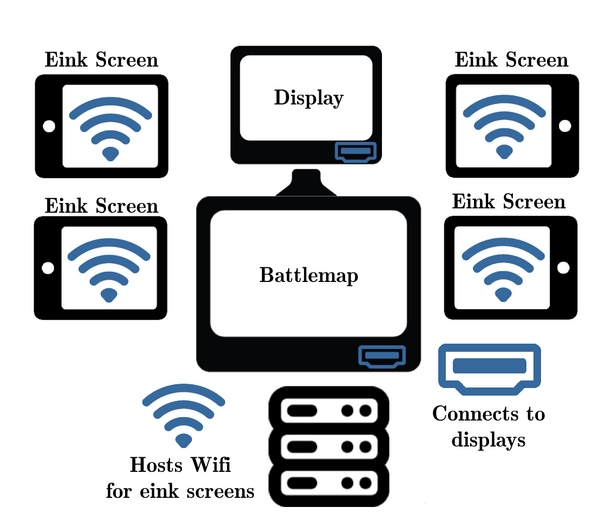
Multi-Display Setup
Support for complex multi-screen configurations:
- DM Control Screen: Web interface for managing content
- Player Battlemap: Touch-enabled combat display
- E-Ink Displays: Character sheets and handouts
- Secondary Displays: Additional media screens
Configuration
Storage Layout
scrying_glasses/- Active display configurationsvtt_configs/- Battlemap templates for VTT tabdisplay_configs/- Display templates for Display tabtemplates/- E-ink JSON templatesimages/- Image assets for the projectgenerated_images/- E-ink processed images
Environment Configuration
ESP32 Default Credentials (for e-ink displays):
- SSID: player_handouts_andy
- Password: DnDepaper101
Edit ESP32_wifi_code/Loader_esp32wf.ino to change.
License
This project is licensed under the MIT License - see the LICENSE file for details.
Acknowledgments
Technologies: - Actix Web - Rust web framework - Pyglet - Pyglet game library
Roadmap
See TODO.md for detailed roadmap. Highlights:
- Coming Soon:
-
Visual wall fog editor
-
Future Plans:
- Unity/Tilt 5 integration
- Enhanced combat features